Media↗
Dancing Cats 2 review
Praised for adorable artwork and a huge music selection, called one of the best free apps in the music-tile category.
Read discussion →
Dancing Cats – Music Tiles looks like a cutesy novelty built around a meow sound effect, but it plays like a fairly precise piano-tile game once the difficulty settings past the first few songs stop being forgiving about mistimed taps.
Dancing Cats – Music Tiles looks like a cutesy novelty built around a meow sound effect, but it plays like a fairly precise piano-tile game once the difficulty settings past the first few songs stop being forgiving about mistimed taps.
| Genre | Rhythm tile-tapping |
| Core Mechanic | Tap falling tiles in rhythm to make a cat leap forward |
| Platform | Mobile |
The core mechanic is a one-touch system: tap the screen in rhythm and the chosen cat leaps forward from tile to tile across a scrolling track. There’s no complex input scheme to learn, since every action boils down to a single well-timed tap.
New players tend to tap on visual instinct, watching the cat’s position rather than the beat itself, which works fine on slower songs but falls apart once the tempo picks up. Players who improve quickly stop watching the cat entirely and tap purely to the underlying rhythm instead, trusting the animation to follow.
By the time a song reaches its faster remix sections, that shift from visual tracking to pure rhythm tapping becomes the entire difference between a clean run and a broken combo.
The soundtrack leans heavily into pop and K-pop tracks, remixed with playful touches and a signature meow sound effect layered directly into the beat itself. The song list keeps expanding as players progress, with new tracks unlocking alongside new tiles to tap through.
That meow cue is a small detail some players find genuinely useful for timing, while others consider it a gimmick that wears thin after a dozen songs, a fairly common point of disagreement in player discussions.
Progress unlocks additional kawaii cat characters to play as, each with its own distinct look layered on top of the same tap-based movement. None of these unlocks change how the rhythm mechanic functions, keeping the challenge consistent while still giving completionist players a reason to keep clearing songs.
No, the one-touch tap control keeps the barrier to entry low, though accurate beat-based timing still determines the final score.
Some players use it as an audio cue for tile timing, while others tune it out entirely and rely purely on visual tile position.
Yes, progressing through songs unlocks additional cat characters with their own distinct appearances, though the underlying tapping mechanic stays identical across all of them.
The piano-tile format has been done countless times, but Dancing Cats – Music Tiles understands that presentation can carry a familiar mechanic a long way, and that meow-accented remix layer is exactly the detail that separates it from a dozen near-identical tile games sharing the same shelf.
Dancing Cats – Music Tiles looks like a cutesy novelty built around a meow sound effect, but it plays like a fairly precise piano-tile game once the difficulty settings past the first few songs stop being forgiving about mistimed taps.
New players tend to tap on visual instinct, watching the cat’s position rather than the beat itself, which works fine on slower songs but falls apart once the tempo picks up.
Players who improve quickly stop watching the cat entirely and tap purely to the underlying rhythm instead, trusting the animation to follow.
None of these unlocks change how the rhythm mechanic functions, keeping the challenge consistent while still giving completionist players a reason to keep clearing songs.
Tips are drawn from the game guide on this page.


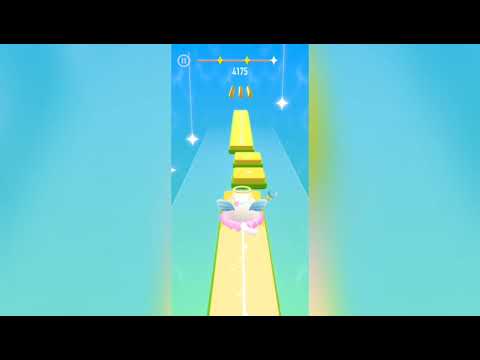
A piano-tiles rhythm game where you hold and drag a dancing cat across tiles to pop-music tracks.
Praised for adorable artwork and a huge music selection, called one of the best free apps in the music-tile category.
Read discussion →Yes — every game on this site is 100% free. No download, no account and no paywall; press Play and the game loads right in your browser.
Most browser games here run on phones and tablets, though a few titles play best on desktop. If the page loads, the game is playable — just allow mic access where requested.
The guides section covers voice games in depth — from first-session setup and mic fixes to building voice packs. For this game specifically, the guide on this page walks through the details.