Media↗
Blob Opera featured in Eurogamer’s Music Week
Eurogamer highlights Blob Opera as David Li’s machine-learning virtual choir — a genuine feat of technology behind a playful toy.
Read discussion →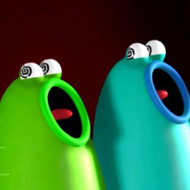
Blob Opera does not look like it should work.
Blob Opera does not look like it should work. Four soft, wobbling blobs stand in for an opera quartet, and dragging your cursor up or down each one changes pitch in real time — yet somehow the result sounds genuinely operatic rather than like a novelty toy.
Blob Opera assigns each blob a distinct vocal range — soprano, mezzo-soprano, tenor, and bass — and dragging a blob vertically shifts its pitch continuously rather than in fixed musical steps, letting you glide between notes the way a real singer would. Clicking a blob toggles it between an open “ah” vowel and a closed hum, giving even a single voice two very different textures to play with.
New users almost always make the same mistake first: they treat the blobs like a simple slider and move all four at once, producing a muddy wash of pitch instead of anything resembling harmony. Players who get more out of the tool tend to isolate one voice at a time, build a stable chord across all four, and only then start moving individual blobs to create melodic movement on top.
What separates Blob Opera from a basic pitch toy is the machine learning model trained on real opera singers, which nudges your input toward harmonically coherent results even when your dragging is imprecise. This is the detail most players discover by accident and then can’t stop mentioning afterward — the sense that the tool is quietly correcting toward something musical rather than simply mapping mouse position to raw pitch.
Curious tinkerers spend most of their time testing extremes — dragging a blob to its lowest or highest possible pitch just to hear the voice strain at its range — while more musically inclined users use Blob Opera to sketch actual four-part harmony ideas before moving them into other software.
It’s worth being honest about the limits here: Blob Opera doesn’t let you input specific notes precisely, doesn’t support saving elaborate compositions beyond a shareable short recording, and offers no lyrics beyond the vowel sounds. Some players find that restrictive after the initial novelty fades, and that’s a fair criticism — Blob Opera was built as a playful demonstration rather than a full composition tool, and it doesn’t pretend otherwise.
Yes, Blob Opera includes a feature for capturing a short recording of your performance that can be shared with others.
No — the voices use vowel sounds like “ah” and closed humming rather than full lyrics, keeping the focus on pitch and harmony rather than language.
This usually happens when voices are pushed to the very edges of their vocal range, where the underlying model has less natural singing data to draw from, making the tone sound strained rather than incorrect.
Blob Opera earns its lasting appeal from that gap between how silly it looks and how legitimately musical it sounds once you slow down, isolate the bass blob, and actually listen to what a real four-part chord is doing underneath the wobbling animation.
Blob Opera does not look like it should work.
Four soft, wobbling blobs stand in for an opera quartet, and dragging your cursor up or down each one changes pitch in real time — yet somehow the result sounds genuinely operatic rather than like a novelty toy.
Blob Opera assigns each blob a distinct vocal range — soprano, mezzo-soprano, tenor, and bass — and dragging a blob vertically shifts its pitch continuously rather than in fixed musical steps, letting you glide between notes the way a real singer would.
New users almost always make the same mistake first: they treat the blobs like a simple slider and move all four at once, producing a muddy wash of pitch instead of anything resembling harmony.
Players who get more out of the tool tend to isolate one voice at a time, build a stable chord across all four, and only then start moving individual blobs to create melodic movement on top.
Tips are drawn from the game guide on this page.


Blob Opera is a machine-learning experiment by artist David Li in collaboration with Google Arts & Culture. Four blobs sing in real time — you drag them to shape pitch and harmony, and the AI nudges the result toward something operatic.
Eurogamer highlights Blob Opera as David Li’s machine-learning virtual choir — a genuine feat of technology behind a playful toy.
Read discussion →Inverse breaks down how the model was trained on 16 hours of operatic vocals and turns serious ML into something anyone can play with.
Read discussion →Yes — every game on this site is 100% free. No download, no account and no paywall; press Play and the game loads right in your browser.
Most browser games here run on phones and tablets, though a few titles play best on desktop. If the page loads, the game is playable — just allow mic access where requested.
The guides section covers voice games in depth — from first-session setup and mic fixes to building voice packs. For this game specifically, the guide on this page walks through the details.