Community↗
The concept of Geometry Dash Wave
An analysis of why the Wave mode is one of the most punishing in Geometry Dash: pixel-perfect control, zero margin for error.
Read discussion →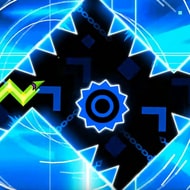
In Geometry Dash Wave you start every level already mid-transformation, locked into the diagonal zigzag of the Wave form with no cube, ship, or ball icon to fall back on, which matters because Wave behaves nothing like any of them.
In Geometry Dash Wave you start every level already mid-transformation, locked into the diagonal zigzag of the Wave form with no cube, ship, or ball icon to fall back on, which matters because Wave behaves nothing like any of them.
Cube and Ship movement in the wider Geometry Dash series carries a small cushion of momentum and delay that softens a slightly late input. The Wave form used throughout Geometry Dash Wave has none of that: holding the input sends the wave climbing at a fixed angle, releasing sends it dropping at the same angle, and both reactions land instantly.
That instant responsiveness is exactly what long-time fans point to when explaining why Wave sections built a reputation across the broader Geometry Dash community even before this dedicated take existed. A cube player’s instinct to tap-and-recover simply does not translate, since there is no recovery window here at all.
New players consistently misjudge how little room the wave has to correct itself mid-climb, treating a near-miss the way they would in Ship mode, where drifting slightly off course rarely ends a run outright.
Levels are built around tight diagonal corridors that leave almost no margin for error, forcing players to read upcoming geometry several beats ahead of where the wave currently sits. Because the movement pattern has no natural pause, planning has to happen continuously rather than obstacle by obstacle.
Speedrun-focused players tend to memorize entire corridor sequences as a single held rhythm rather than a string of individual taps, while players attempting a level for the first time usually die repeatedly on one specific diagonal squeeze before the timing settles into muscle memory.
Levels typically introduce their hardest corridor about two-thirds of the way through, which is often the exact point where a otherwise-successful attempt ends, a detail only obvious after enough failed runs to notice the pattern.
Geometry Dash Wave isn’t trying to ease anyone in gently, and once a corridor finally clicks after the twentieth attempt, that specific relief, the one Cube or Ship never quite produces the same way, is the whole reason players who master Wave keep chasing harder corridors instead of going back to it.
Because the movement pattern has no natural pause, planning has to happen continuously rather than obstacle by obstacle.
Speedrun-focused players tend to memorize entire corridor sequences as a single held rhythm rather than a string of individual taps, while players attempting a level for the first time usually die repeatedly on one specific diagonal squeeze before the timing settles into muscle memory.
Geometry Dash Wave isn’t trying to ease anyone in gently, and once a corridor finally clicks after the twentieth attempt, that specific relief, the one Cube or Ship never quite produces the same way, is the whole reason players who master Wave keep chasing harder corridors instead of going back to it.
Tips are drawn from the game guide on this page.


A browser tribute to Geometry Dash’s wave mode: hold to rise, release to fall, with no recovery window once a mistimed input commits.
An analysis of why the Wave mode is one of the most punishing in Geometry Dash: pixel-perfect control, zero margin for error.
Read discussion →Players discuss how Wave has no jumps or gravity flips, making the input extremely sensitive and rewarding practice.
Read discussion →Yes — every game on this site is 100% free. No download, no account and no paywall; press Play and the game loads right in your browser.
Most browser games here run on phones and tablets, though a few titles play best on desktop. If the page loads, the game is playable — just allow mic access where requested.
The guides section covers voice games in depth — from first-session setup and mic fixes to building voice packs. For this game specifically, the guide on this page walks through the details.